Ever Wondered How to Set Up an Online Vintage Store?
For today’s discussion on “How to Set Up an Online Vintage Store” a promotional item was provided to me. The host for this event is Still Blonde after all these Years.
Always wanted an online vintage store (or any kind of a store) but just don’t know where to start?
I have always wanted an online vintage store. I have had the website address http://stillvintageafteralltheseyears .com since I started my Still Blonde after all these Years site. 7+ years I have dreamed of opening that store and still I haven’t done it. I considered all kinds of approaches to starting my store but always abandoned them due to the effort and expense of setting up my own customized site or the hassle of dealing with another company taking fees from my products (ebay, etsy, etc.).
I had all but given up on my dream of Still Vintage after all these Years…
How to set up an Online Vintage Store and Have it Open in 3 hours
I discovered a solution to my online store problem and it is so easy! Anyone can have their vintage store up and running in 3 hours or any kind of online store for that matter. If you could set up an online store in 3 hours, what would you sell?
is promoting their . There are various price levels. Personal Websites start at $5.99/month including website hosting (and take less than an hour to set up)…really! That’s a steal for website hosting alone but then throw in the GoCentral Website Builder with all it’s bells and whistles and you get a real bang for your buck! See what option works for you:

I chose the GoCentral Website Builder Online Store option for $29.99. Everything was totally set up for me with the exception of me chosing my options. I just had to enter my products and descriptions, put in my shipping and payment options, and BAHM! I have a store.
Let me show you How to set up an Online Vintage Store and Have it Open in 3 hours!
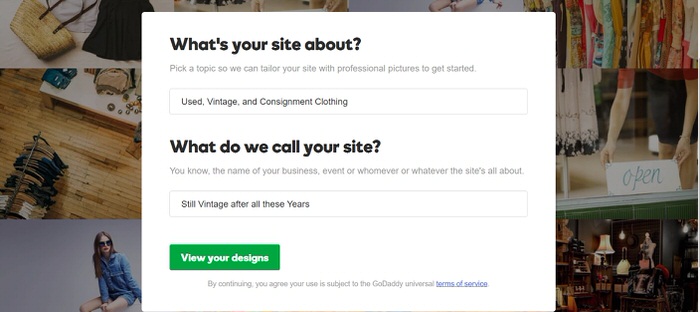
First, I went in and signed up for my one month free trial! No credit card required! Then I was asked a few simple questions about my topic and site name. The GoCentral Website Builder then knew what feel to give my store and choose stock vintage pictures to get me started.
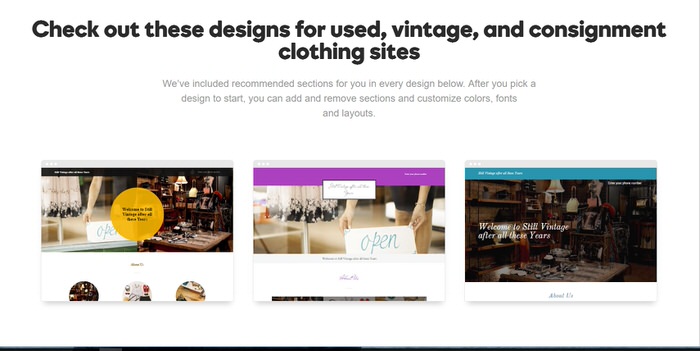
Once I let GoCentral Website Builder know that I wanted a vintage store, it presented me with 12-15 designs to choose between. This was so exciting. I could see the beginning of my store forming. It was fun to preview the different looks and choose the one that worked for me.
I was able to look at each design and see what it would look like on a computer or on mobile. That was super helpful. I loved that the designs were already “Responsive Mobile Designs” because that is what Google and other search engines are demanding.
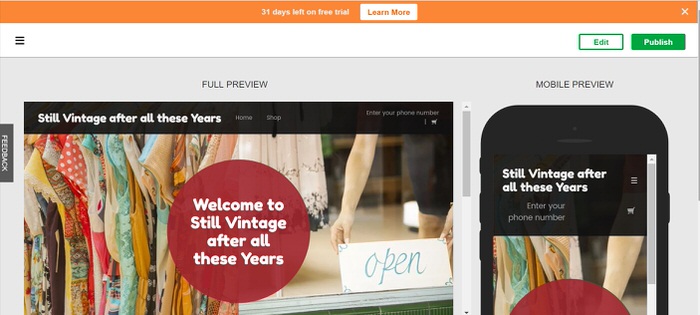 Once I chose my basic design, I was able to start editing right away. I didn’t have to understand code or anything. Just make choices and start editing. The process was so smooth! I could easily swap out photos, change fonts, and add in relevant contact information.

Once I got the site looking like I wanted, I went in and set up the store.
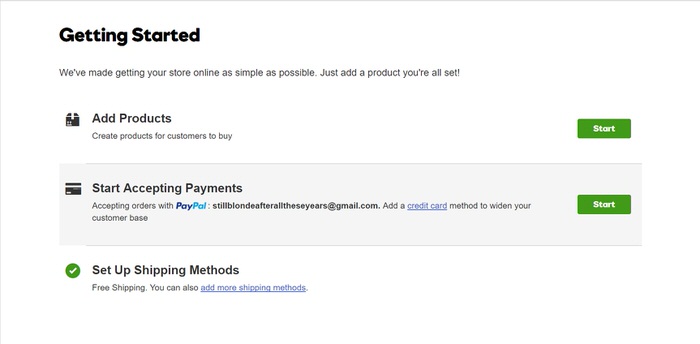
This is the part that always freaked me out in the past. Wow! It was so easy. First, I added in some products.
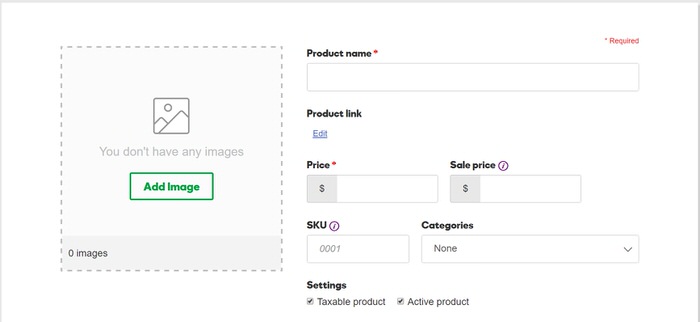
After saving, it let me add more product detail. How could it be this simple? Although, I didn’t show the steps, on this screen you can use the various tabs to set up Inventory options, Shipping and make Search Engine choices. PSST: Almost everything that you might not understand has a little circled “i” next to it to give you a bit more explanatory information.

I then went back to the “Getting Started” screen and set up my Payment Methods. I was simply shocked to see that GoDaddy GoCentral Website Builder has a simple “no set up fee credit card” payment availability, paypal options and more. I didn’t have to figure out anything…just make my choices. Guys…if you have ever wanted to set up a store you must at least consider GoDaddy GoCentral Website Builder! This is almost painless!

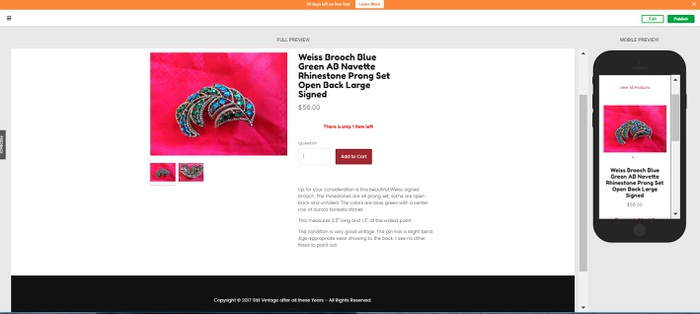
Most websites take days and $$$$ working with a designer to get them set up. But in less than 3 hours, my store was ready to go. I now had three items ready to sell. I could easily view the website as my customers would see it via a computer or mobile. Here’s the home page (it’s hard to get the full effect with this little screenshot but it looked awesome):

Here’s the category page:

Here’s the individual product page:
Finally, here’s the shopping cart of my vintage online store! I am hoping many of my customers will be seeing this page!

Still have questions on how to set up a website or online store with GoDaddy’s GoCentral Website Builder?
Once I started my trial, I contacted their help line to ask a few questions, they were SOOOOOOO helpful and sweet. 24/7 availability is a huge plus for me with a help line! 24/7 Support ph. # (480) 505-8877
Get your free 1 month trial of GoDaddy’s GoCentral Website Builder
Now that you know how to set up an online vintage store and have it open in 3 hours…
- No credit card required!!! If you love it, make it yours after the trial.
- Dates Offer Available For: Now through 4/10/2017
- Disclaimers or Restrictions for offer: The Free Trial is an opportunity for you to use a GoDaddy product free of charge for one (1) month, beginning on the date that you accept the Free Trial offer. The Free Trial will expire one (1) month from the date you accept the Free Trial offer, regardless of whether or not you use the product during the Free Trial period. Free trial not available in all markets.

What great ideas!
Great tips! Efficient and quick too. What I strive for each day.
I need to tell a friend about this. She has lots of neat stuff to sell.
I like all of the tips and pointers on setting up a business in a short amount of time. I love your informative blog a lot.
I would so love to do this someday!
You make it look so easy and fun! Thanks for sharing.
I still think it would take me longer than 3 hours. I’m a slow learner when it comes to computer website issues
What a great idea. Never thought about doing this.
Very informative Thank you
Looks easy enough. Keep us up to date on how yours is going.
You are a wonder Shelly, you make me think that even I could do that.
Margot, you would be shocked how easy it is. ANDDDD they will answer all your questions. Shelley
Thanks for this great article. I sell now on Ebay, Amazon and Etsy and would like to venture to my own online eventually.
This would be great to do
Sounds great thanks for the info
I don’t have any use for this at the moment, but it’s great to know how easy it is to set up and use. Will definitely keep it in mind for the future; thanks for the info.
I’ve been thinking of opening an online clothing boutique! This looks like a great way to get started.
I have to let all my would be blogger friends know about Go Daddy Go Central Website Builder. Your store of vintage items is such a great idea.
Wishing you all the best with your online store. Who knew setting it up could be so easy?
I love how easy GoDaddy is to use. I can get quite expensive using a web designer.
This sounds awesome! I love vintage stuffs! I wish I could try this one day!