Steps to Host an Online Party Steps as a Verizon Boomer Blogger
This How to Host an Online Party post is presented in conjunction with my participation in the Verizon Voices Boomer program and I have been provided with a wireless device and six months of service in exchange for my honest opinions about the product.

The Chief Blonde co-hosts an online party for Verizon!
Have you ever considered a online digital party instead of a twitter party?
Recently, I co-hosted an online house party. As a Verizon Blogger, we are required to host two house parties. However, my co-host Lynne Cobb and I decided an online party might be a fun alternative. If you are preparing to host an online digital party, then there are steps to follow to ensure a great party.
1. Pick a co-host or get family members to support you. Just like an at-home party or a twitter party, it’s very hard to run an online party alone. I chose Lynne Cobb from LynneCobb.com, another Verizon Voices Boomer blogger (or maybe she chose me, I’m not sure.). You will appreciate having a capable partner like Lynne Cobb because a digital party takes a lot of effort to plan well.

2. Pick a day/time to host the party. This sounds simple but you have to take in account the schedules of all involved including your co-host, the attendees, and the deadlines established by the host company.
3. Determine who to invite. Your invites should be based on the party theme and host company’s needs. You also have to have some incentive for participants to attend such as a giveaway or prizes (or your great company!) For our party, we decided that inviting other Michigan bloggers would be fun. They would get exposure to Verizon’s great line of products, we would meet many new Michigan bloggers and Verizon would garner new names to use in their Midwest ambassador program, if needed.
4. Choose hosting software/app. There are a multitude of ways that you can host a party online.You can utilize a Google Hangout, meet in a Facebook application, or utilize meeting software (like Meeting burner or Go-to-Meeting). The meeting function that you choose must be able to host the number of people that you want to invite, preferably have a way to host pictures or video, have a chat function so participants can talk to you, and be easy to learn. We chose Meeting Burner for our party.
5. Schedule pre-party meeting. Lynne and I had 6 pre-party meetings to prepare slides, practice using the software, decide on logistical details like sending out invites, etc. Plan, plan, plan. Practice, practice, practice. I cannot stress this enough.
6. Put together a detailed agenda. When hosting your party, it goes so fast. Chat is whirring by, you may be demoing products, questions are being asked, prizes are being drawn. You will miss important elements if you do not have a tight agenda.
7. Determine your hosting facility. Lynne and I decided to meet at church where she works and host the party together in the same room. We had 3 computers going and we traded off presenting the Verizon products that we were demoing and giving away. A place to do this with great reliable internet is a must.
8. Be quick. During the actual party, even though you have everything planned, something will not go as expected. Hopefully, your practice will prepare you for anything that might go wrong but you must be prepared for the worst. Be quick on your feet and try to help participants understand what is going on if a hiccup occurs.

Lynne Cobb monitors the party chat feed during the Verizon Voices Online House party
Our Verizon Voices Digital Party
As you probably remember, I have been a member of the Verizon Voices program when I started as a style blogger and transitioned over to being a boomer blogger.

As I mentioned in the steps above, as Verizon boomer bloggers we are required to host 2 parties during the 6 months of the program. For our parties, Verizon provided us with a wonderful grouping of products to giveaway, including a swag bag just for attending.
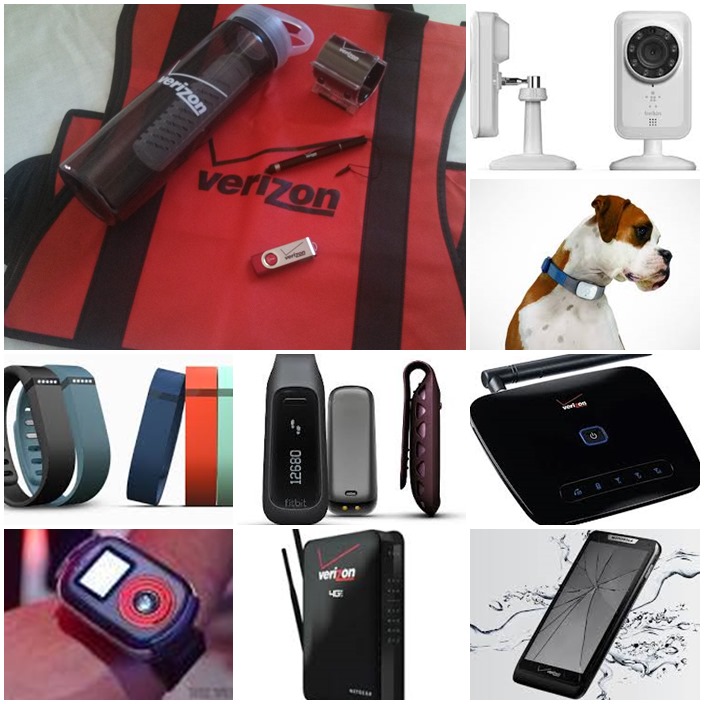
Prizes for the party included: (left to right, top to bottom) a Verizon Swag Bag, Belkin Net Cam, Tagg Pet Tracker, Fitbit Flex, Fitbit Zip, Home Phone Connect, Sure Response, 4g LTE router with Voice, Total Mobile protection.
The participants had great fun in the chat room. They not only asked us questions about the devices we were presenting but they also related stories to one another about the devices and made lots of fun jokes. One woman told how her mother used the Sure Response and how much she loved it. I had not anticipated having such a good time.
We drew for prizes after each presentation (with an included drum roll) and gave away 14 prizes totaling $1900. You can bet our 19 party participants enjoyed that!
What we learned from our first online house party
All in all, a digital party entailed a lot of work. Some of this was due to the learning curve necessary to teach ourselves the meeting software. Next time, we might try a Google hangout. We also learned that demoing a large number of items is a challenge for the presenters but those attending didn’t seem to notice. We recommend sending the entrants a pre-party slide package, as we did, so they can learn about the products and enter to win the prizes they want ahead of time. Drawing winners ahead of time is an absolute must IMO but can be tricky if one of the winner doesn’t attend.
The next Verizon Voices Online party will be during the second week of December so watch for that!
See all of our Verizon Voices Boomer & Style Posts including our most recent review on the DROID Motorola RAZR MAXX HD!
Well done ladies! I might even consider doing an online party after reading how well you two did. 🙂
If I ever host one, now I know who to come to. Wow!
Sounds so simple! Actually, it was. And you are wonderful to work with – I think we make a great team!
Right Back at you Lynne! The Chief Blonde!